
Idle> /gun/particle mu-
Shoot your first particle: Run, Event, Track, Step.发射第一个粒子:运行、事例、径迹、步。
You take a Geant4 application that already works and change only the particle, its energy, its starting point and its direction. Only after you have watched it run do you learn the event model that made it work.
拿到一个已经能运行的 Geant4 程序,只改动粒子种类、能量、起点和方向。先看它跑起来,再学习背后让它运转的事例模型。
Overview概览3 min3 分钟
/run/initializelearning goals学习目标
By the end of this week you can read a Geant4 step table line by line.本周结束时,你能逐行读懂 Geant4 的步表。
- Build and run a minimal Geant4 11.4 application, and change the four gun settings by recompiling and by macro.编译并运行一个最小的 Geant4 11.4 程序,分别通过重新编译和宏命令修改粒子枪的四项设置。
- State the event model Run → Event → Track → Step运行 → 事例 → 径迹 → 步 and point to each level in
/tracking/verbose 1output.说出事例模型运行 → 事例 → 径迹 → 步Run → Event → Track → Step,并在/tracking/verbose 1的输出中指出每一层。 - Explain why
GeneratePrimaries()runs once per event and what that means for the primary generator初级粒子产生器.解释为什么GeneratePrimaries()每个事例运行一次,以及这对初级粒子产生器primary generator意味着什么。 - Compute a decay length βγcτ and predict whether a particle decays inside the world.计算衰变长度 βγcτ,预测粒子是否会在世界内衰变。
- Diagnose a run with no visible tracks, starting from the gun position, the direction and the world size.诊断“看不到径迹”的运行:先查粒子枪位置、方向和世界大小。
Reading阅读9 min9 分钟
/control/echo backgroundbackground · for non-physicists背景知识 · 写给非物理专业
Before Geant4: particles, energy and why a muon lives long enough to reach you.进入 Geant4 之前:粒子、能量,以及缪子为什么能活着到达你身边。
Background · Kinetic energy, momentum, mass动能、动量、质量
Geant4's particle gun sets kinetic energy, the energy of motion. Momentum p and kinetic energy T are linked by p = √(T² + 2Tm) in units where c = 1; the muon mass is m = 105.7 MeV. For a 1 GeV muon, p = 1.10 GeV/c. Above a few GeV, p and T are nearly equal, so muography papers often quote either.
Geant4 的粒子枪设定的是动能,即运动的能量。在 c = 1 的单位制中,动量 p 与动能 T 的关系是 p = √(T² + 2Tm);缪子质量 m = 105.7 MeV。1 GeV 的缪子 p = 1.10 GeV/c。几个 GeV 以上时,p 和 T 几乎相等,所以缪子成像文献两种说法都有。
Background · Decay and time dilation衰变与时间膨胀
A muon at rest lives 2.197 µs on average and then decays into an electron and two neutrinos. A moving muon's clock runs slow by the factor γ = E/m. A 1 GeV muon (γ ≈ 10.5) travels about 7 km on average before decaying, so in any detector-sized world you will almost never see it decay in flight. Stopped muons, as in Week 10, do decay in front of you.
静止的缪子平均寿命 2.197 µs,之后衰变为一个电子和两个中微子。运动缪子的时钟按因子 γ = E/m 变慢。1 GeV 的缪子(γ ≈ 10.5)平均要飞约 7 km 才衰变,所以在探测器尺度的模拟世界里几乎看不到它在飞行中衰变。停下来的缪子(如第 10 周)才会在你面前衰变。
Background · Run, event, track, step in plain words用大白话说运行、事例、径迹、步
A run is one experiment with fixed settings, like one load case. An event is one muon arriving, plus everything it causes. A track is the path of one particle, including the electrons it knocks out. A step is one short segment of a track, ending at a material boundary or where something happens. Geant4 computes physics step by step, much as a time-stepping solver advances a structure.
一次运行是设置固定的一次实验,类似一个工况。一个事例是一个缪子到来及其引起的一切。一条径迹是一个粒子的路径,包括被它打出来的电子。一步是径迹中的一小段,在材料边界或发生某种过程时结束。Geant4 一步一步地计算物理,就像时间步进求解器一步步推进结构响应。
For muography projects用于缪子成像工程
A muography data set is millions of events, each one cosmic muon. Changing particle, energy, position and direction is exactly how you will later aim a simulated sky at a model of a hillside.
缪子成像的数据集由数百万个事例组成,每个事例是一个宇宙线缪子。改变粒子种类、能量、位置和方向,正是你以后把模拟天空“对准”山坡模型的方法。
New to muons, units such as g/cm² or m.w.e., or muography? Start with the background primer.还不熟悉缪子、g/cm² 或米水当量这类单位,或缪子成像?先读入门背景。
Event display事例显示3 min3 分钟
/vis/open TSGevent display事例显示
Replay your own Geant4 events.回放你自己的 Geant4 事例。
Reading阅读7 min7 分钟
/control/manual2.1 · run it first2.1 · 先运行,再追问
Change a number, watch the output change, then learn the class behind it.先改一个数、看输出变化,再学背后的类。
The challenge is direct: fire a 1 GeV muon into an empty world and watch it move. You get a minimal application that already works. You change four parameters of the primary generator: particle species, energy, position and direction. Then you rebuild, run and compare the output. A class whose output you have never seen costs twice as much to learn.
挑战很直接:向一个空世界发射一个 1 GeV 的缪子,看它运动。你拿到的是一个已经能运行的最小程序,只需改动初级粒子产生器的四个参数——粒子种类、能量、位置、方向——然后重新编译、运行、比较输出。一个从没见过输出的抽象类,学起来要多花一倍的力气。
What Geant4 is doingGeant4 在做什么
For a primary muon, Geant4 creates a track, works out how far it can travel before the next boundary or physics interaction, moves it by one step, updates its state, and repeats until the track ends. The world is empty this week, so the physics is deliberately minimal: you learn the transport loop before adding matter.
对一个初级缪子,Geant4 先创建一条径迹,算出在下一个边界或物理相互作用之前它能走多远,把它推进一步,更新状态,如此循环直到径迹结束。本周的世界是空的,物理被刻意减到最少:先学输运循环,再加入物质。
Definition 2.1 · The Geant4 event modelGeant4 事例模型
A Run consists of one or more Events, all sharing the same detector construction and physics settings. Each Event contains one or more Tracks, each the complete history of a single particle from creation to termination. Each Track is divided into a sequence of Steps, each ending at a geometric boundary crossing or at the occurrence of a physics process.
一次运行(Run)包含一个或多个事例(Event),它们共享同一套探测器构建和物理设置;每个事例包含一条或多条径迹(Track),每条径迹是单个粒子从产生到消失的完整历史;每条径迹又被离散为一串步(Step),每一步结束于穿越几何边界或某个物理过程的发生。
/run/beamOn N GeneratePrimaries() one particle each boundary or process
Figure 2.1. A run contains events, events contain tracks, and tracks advance through steps. GEANT3 used the same run/event/track/step hierarchy; other transport codes (FLUKA, MCNP) count primaries and histories, and the mapping is similar but not one to one.图 2.1 运行包含事例,事例包含径迹,径迹由步推进。GEANT3 使用同样的运行/事例/径迹/步层次;其他输运程序(FLUKA、MCNP)以初级粒子和历史(history)计数,对应关系相近但并非一一对应。
Reading阅读7 min7 分钟
/gun/energy 1 GeV2.2 · the primary generator2.2 · 初级粒子产生器
Four setters define the experiment. There is no fifth hidden setting.四个设置函数定义了整个实验,没有隐藏的第五项。
Example 2.1 · A minimal primary generator最小的初级粒子产生器
Configure the primary generator to fire a 1 GeV negative muon (μ⁻) along +z, starting inside the world and aimed toward its centre. In the official Geant4 examples this lives in a class called PrimaryGeneratorAction, derived from G4VUserPrimaryGeneratorAction. This course keeps that name throughout.
配置初级粒子产生器,沿 +z 方向发射一个 1 GeV 的负缪子(μ⁻),起点在世界内部、指向中心。在官方 Geant4 示例中,这段配置位于派生自 G4VUserPrimaryGeneratorAction 的 PrimaryGeneratorAction 类中,本课程沿用这个类名。
fParticleGun->SetParticleDefinition(particle);                          // 1. species   ("mu-")
fParticleGun->SetParticleMomentumDirection(G4ThreeVector(0., 0., 1.));  // 2. direction (+z)
fParticleGun->SetParticleEnergy(1. * GeV);                              // 3. KINETIC energy
fParticleGun->SetParticlePosition(G4ThreeVector(0., 0., -1. * m));      // 4. position

void PrimaryGeneratorAction::GeneratePrimaries(G4Event* event)
{
  fParticleGun->GeneratePrimaryVertex(event);   // once per Event
}
Two details matter when you compare this with the official examples. First, GeneratePrimaries is called once per event, not once per run. If you want every event to sample a different energy or position, change the gun inside this method, not in the constructor. Second, SetParticleEnergy sets the kinetic energy, the quantity that enters γ = 1 + T/mc².
与官方示例对照时有两个细节。第一,GeneratePrimaries 每个事例调用一次,而不是每次运行调用一次;想让每个事例的能量或位置不同,就在这个函数里修改粒子枪,而不是在构造函数里。第二,SetParticleEnergy 设置的是动能,也就是 γ = 1 + T/mc² 中的 T。
Reading阅读9 min9 分钟
/particle/property/dump2.3 · why nothing decays2.3 · 为什么没有衰变
The muon does not decay because 6.9 km is longer than 2.5 m, not because the world is empty.缪子不衰变,是因为 6.9 km 远大于 2.5 m,而不是因为世界是空的。
With no matter in the world, the muon loses no energy and scatters off nothing. It flies in a straight line at constant velocity until it leaves the world. Decay is a different matter: it is a property of the particle itself, simulated whether or not matter is present. A particle with mean lifetime τ, moving with βγ = p/mc, travels on average
世界中没有物质时,缪子不损失能量、也不被散射,只以恒定速度沿直线飞出世界。衰变则是另一回事:它是粒子自身的性质,有没有物质都会被模拟。平均寿命为 τ、βγ = p/mc 的粒子,平均飞行距离为
| Primary初级粒子 | γ | βγ | λ = βγcτ | P(decay in 2.5 m)2.5 m 内衰变概率 |
|---|---|---|---|---|
| μ⁻ · 1 GeV | 10.46 | 10.42 | 6.86 km | 3.6 × 10⁻⁴ |
| μ⁻ · 100 MeV | 1.946 | 1.670 | 1.10 km | 2.3 × 10⁻³ |
| π⁻ · 1 GeV | 8.165 | 8.103 | 63.2 m | 0.039 |
| π⁻ · 100 MeV | 1.717 | 1.395 | 10.9 m | 0.205 |
Kinetic energies. Masses and lifetimes as Geant4 11.4 reports them (/particle/property/dump, PDG values): μ: 105.658 MeV, τ = 2196.98 ns, cτ = 658.6 m. π±: 139.570 MeV, τ = 26.033 ns, cτ = 7.80 m.表中为动能。质量和寿命取自 Geant4 11.4 的 /particle/property/dump 输出(PDG 值):μ:105.658 MeV,τ = 2196.98 ns,cτ = 658.6 m;π±:139.570 MeV,τ = 26.033 ns,cτ = 7.80 m。
Think about it想一想
Switch the particle from mu- to proton at the same energy, in this vacuum world. How does the step table change? What about gamma? Guess first, then run step 5 of the hands-on task. Then try pi- at 100 MeV: how many of 1,000 events should contain more than one track?
在这个真空世界里,把粒子从 mu- 换成同能量的 proton,步表会怎样变化?换成 gamma 呢?先猜,再完成动手任务第 5 步。然后试 100 MeV 的 pi-:1,000 个事例中应有多少个包含不止一条径迹?
History历史
Geant4 was developed by an international collaboration led by CERN to replace GEANT3, a Fortran code that had become hard to maintain, with an object-oriented framework for the LHC experiments. The first release came in 1998. The foundational paper, Agostinelli et al., Nucl. Instrum. Methods A 506 (2003) 250, made it a standard across high-energy, nuclear, medical and space physics, and muography.
Geant4 由 CERN 牵头的国际合作组开发,用面向对象框架取代难以维护的 Fortran 程序 GEANT3,服务于 LHC 实验。首个正式版本发布于 1998 年。奠基论文 Agostinelli 等,Nucl. Instrum. Methods A 506 (2003) 250,使其成为高能物理、核物理、医学物理、空间科学以及缪子成像领域的事实标准。
Interactive交互10 min10 分钟
/run/beamOn 100interactive toy model交互玩具模型
Fire events and watch a track end at a wall or a decay.发射事例,看径迹终止于边界还是衰变。
Each /run/beamOn starts a new run. The panes below show the step table and the Run → Event → Track → Step tree for the last event. Try the pion preset, then shrink the world, raise the energy, or move the gun outside the world.
每次 /run/beamOn 都开始一次新的运行。下方面板显示最后一个事例的步表和“运行 → 事例 → 径迹 → 步”树。先试试 π 预设,再缩小世界、提高能量,或把粒子枪移出世界。
Tracks that reach the wall without decaying go into the Overflow, as ROOT would count them.未衰变就到达边界的径迹计入 Overflow,与 ROOT 的计数方式相同。
/tracking/verbose 1 · last event, track 1最后一个事例,径迹 1
event model of the last event最后一个事例的事例模型
TOY MODEL · approximations近似
Vacuum world: no energy loss, scattering or interactions. Each primary goes straight along ±z until it reaches the boundary or decays after a distance drawn from exp(−x/λ). Masses, lifetimes and decay channels are those Geant4 11.4 prints. Decay products are listed but not transported; their drawn directions are random decoration, not decay kinematics. The step-table format copies Geant4 11.4 output; the numbers come from this toy. The vertex check follows Geant4 11.4: /gun/position is refused outside the world once the run is initialised, and a constructor position is not checked.
真空世界:没有能量损失、散射或相互作用。每个初级粒子沿 ±z 直线飞行,直到到达边界,或在按 exp(−x/λ) 抽样的距离处衰变。质量、寿命和衰变道取自 Geant4 11.4 的输出。衰变产物只列出、不输运,画出的方向是随机装饰,不是衰变运动学。步表格式照搬 Geant4 11.4 输出,数值来自本玩具模型。顶点检查与 Geant4 11.4 一致:运行初始化后 /gun/position 拒绝世界外的位置,构造函数中设置的位置不受检查。
Hands-on lab动手实验40 min40 分钟
/control/execute run1.machands-on · Lab 2动手任务 · 实验 2
Build it, fire it, change it four ways, then count decays.编译、发射、四种改法,然后数衰变。
Download all files for this lab (zip)下载本实验的全部文件(zip)all weeks全部周次
You need Geant4 11.4 with its datasets and CMake ≥ 3.16: if you have not installed them, follow Week 0 · Set up your computer first. Every expected output below is real Geant4 11.4.p01 output from these exact files. Our sandbox has no Geant4 datasets, so we ran with a decay-only physics list in place of FTFP_BERT. In vacuum the step tables are the same, except that with FTFP_BERT the dE column may show a tiny number (about 10⁻²³ MeV) from ionisation in the residual gas of G4_Galactic. Your terminal will also print physics-list tables first.
需要带数据集的 Geant4 11.4 和 CMake ≥ 3.16:如果还没有安装,请先按第 0 周 · 配置你的电脑操作。下面每个预期输出都来自这些文件在 Geant4 11.4.p01 上的真实运行。我们的沙盒没有 Geant4 数据集,因此用只含衰变的物理列表代替了 FTFP_BERT。在真空中步表相同,只是用 FTFP_BERT 时 dE 列可能出现极小的数(约 10⁻²³ MeV),来自 G4_Galactic 残余气体中的电离。你的终端还会先打印物理列表的信息表。
-
Create the project建立工程
Make this layout and paste each file. Open a file to see it.
按下面的目录结构建立文件,逐个粘贴。点击文件名展开。
week02/
├── CMakeLists.txt
├── week02.cc
├── include/  DetectorConstruction.hh  PrimaryGeneratorAction.hh  ActionInitialization.hh
├── src/      DetectorConstruction.cc  PrimaryGeneratorAction.cc  ActionInitialization.cc
└── run1.mac  gun.mac  outward.mac  pion.mac  vis.mac
CMakeLists.txtGEANT4
cmake_minimum_required(VERSION 3.16) project(Week02 LANGUAGES CXX) set(CMAKE_CXX_STANDARD 17) set(CMAKE_CXX_STANDARD_REQUIRED ON) find_package(Geant4 REQUIRED ui_all vis_all) include(${Geant4_USE_FILE}) file(GLOB sources CONFIGURE_DEPENDS ${PROJECT_SOURCE_DIR}/src/*.cc) file(GLOB headers CONFIGURE_DEPENDS ${PROJECT_SOURCE_DIR}/include/*.hh) add_executable(week02 week02.cc ${sources} ${headers}) target_include_directories(week02 PRIVATE include) target_link_libraries(week02 PRIVATE ${Geant4_LIBRARIES}) # copy the macros next to the executable foreach(_mac run1.mac gun.mac outward.mac pion.mac vis.mac) configure_file(${PROJECT_SOURCE_DIR}/${_mac} ${PROJECT_BINARY_DIR}/${_mac} COPYONLY) endforeach()week02.ccGEANT4
#include "ActionInitialization.hh"
#include "DetectorConstruction.hh"

#include "FTFP_BERT.hh"
#include "G4RunManagerFactory.hh"
#include "G4UIExecutive.hh"
#include "G4UImanager.hh"
#include "G4VisExecutive.hh"

int main(int argc, char** argv)
{
  // Week 2 runs single-threaded so /tracking/verbose output is not
  // interleaved between worker threads. The usual main() uses
  // G4RunManagerType::Default; we switch to it when we merge MT output.
  auto* runManager =
    G4RunManagerFactory::CreateRunManager(G4RunManagerType::Serial);

  runManager->SetUserInitialization(new DetectorConstruction());
  runManager->SetUserInitialization(new FTFP_BERT());
  runManager->SetUserInitialization(new ActionInitialization());
  runManager->Initialize();

  auto* uiManager = G4UImanager::GetUIpointer();
  if (argc > 1) {
    // batch mode: ./week02 run1.mac
    uiManager->ApplyCommand("/control/execute " + G4String(argv[1]));
  } else {
    // interactive mode: open the viewer
    auto* ui = new G4UIExecutive(argc, argv);
    auto* visManager = new G4VisExecutive();
    visManager->Initialize();
    uiManager->ApplyCommand("/control/execute vis.mac");
    ui->SessionStart();
    delete visManager;
    delete ui;
  }

  delete runManager;
  return 0;
}
include/DetectorConstruction.hh
#ifndef DetectorConstruction_h
#define DetectorConstruction_h 1

#include "G4VUserDetectorConstruction.hh"

class DetectorConstruction : public G4VUserDetectorConstruction
{
  public:
    G4VPhysicalVolume* Construct() override;
};

#endif
src/DetectorConstruction.cc
#include "DetectorConstruction.hh"

#include "G4Box.hh"
#include "G4LogicalVolume.hh"
#include "G4NistManager.hh"
#include "G4PVPlacement.hh"
#include "G4SystemOfUnits.hh"

// Week 2: an empty world. Matter arrives in Week 3.
G4VPhysicalVolume* DetectorConstruction::Construct()
{
  auto* vacuum = G4NistManager::Instance()->FindOrBuildMaterial("G4_Galactic");

  const G4double halfWorld = 1.5 * m;  // a 3 m cube: the gun at z = -1 m is inside
  auto* solidWorld = new G4Box("World", halfWorld, halfWorld, halfWorld);
  auto* logicWorld = new G4LogicalVolume(solidWorld, vacuum, "World");

  return new G4PVPlacement(nullptr, G4ThreeVector(), logicWorld, "World",
                           nullptr, false, 0, true);
}
include/PrimaryGeneratorAction.hh
#ifndef PrimaryGeneratorAction_h
#define PrimaryGeneratorAction_h 1

#include "G4VUserPrimaryGeneratorAction.hh"

class G4ParticleGun;
class G4Event;

class PrimaryGeneratorAction : public G4VUserPrimaryGeneratorAction
{
  public:
    PrimaryGeneratorAction();
    ~PrimaryGeneratorAction() override;

    void GeneratePrimaries(G4Event* event) override;

  private:
    G4ParticleGun* fParticleGun = nullptr;
};

#endif
src/PrimaryGeneratorAction.cc
#include "PrimaryGeneratorAction.hh"

#include "G4Event.hh"
#include "G4ParticleGun.hh"
#include "G4ParticleTable.hh"
#include "G4SystemOfUnits.hh"

PrimaryGeneratorAction::PrimaryGeneratorAction()
{
  G4int n_particle = 1;
  fParticleGun = new G4ParticleGun(n_particle);

  // The four choices that define the experiment (Week 2, Example 2.1):
  G4ParticleTable* particleTable = G4ParticleTable::GetParticleTable();
  G4ParticleDefinition* particle = particleTable->FindParticle("mu-");
  fParticleGun->SetParticleDefinition(particle);                          // 1. species
  fParticleGun->SetParticleMomentumDirection(G4ThreeVector(0., 0., 1.));  // 2. direction
  fParticleGun->SetParticleEnergy(1. * GeV);                              // 3. kinetic energy
  fParticleGun->SetParticlePosition(G4ThreeVector(0., 0., -1. * m));      // 4. position
}

PrimaryGeneratorAction::~PrimaryGeneratorAction()
{
  delete fParticleGun;
}

void PrimaryGeneratorAction::GeneratePrimaries(G4Event* event)
{
  // Called once per Event; this is where the primary vertex
  // and the primary particle's Track are actually created.
  fParticleGun->GeneratePrimaryVertex(event);
}
include/ActionInitialization.hh
#ifndef ActionInitialization_h
#define ActionInitialization_h 1

#include "G4VUserActionInitialization.hh"

class ActionInitialization : public G4VUserActionInitialization
{
  public:
    void Build() const override;
};

#endif
src/ActionInitialization.cc
#include "ActionInitialization.hh"

#include "PrimaryGeneratorAction.hh"

void ActionInitialization::Build() const
{
  SetUserAction(new PrimaryGeneratorAction());
}
run1.mac · gun.mac · outward.mac · pion.mac · vis.mac
# ======== run1.mac ========
# Lab 2, run 1: one 1 GeV mu- with the step table switched on
/tracking/verbose 1
/run/beamOn 1

# ======== gun.mac ========
# Lab 2: change the gun from the macro, no recompilation
/tracking/verbose 1
/gun/particle proton
/run/beamOn 1
/gun/particle gamma
/run/beamOn 1
/gun/particle mu-
/gun/direction 0 0 -1
/run/beamOn 1

# ======== outward.mac ========
# Pitfall demo: gun outside the world, pointing further out
/tracking/verbose 1
/gun/position 0 0 2 m
/gun/direction 0 0 1
/run/beamOn 1

# ======== pion.mac ========
# Think-about-it, quantified: 1000 pi- at 100 MeV kinetic energy
/tracking/verbose 1
/gun/particle pi-
/gun/energy 100 MeV
/run/beamOn 1000

# ======== vis.mac ========
# Interactive viewer: side view of the world with trajectories
/vis/open
/vis/drawVolume
/vis/viewer/set/viewpointThetaPhi 90 90 deg
/vis/scene/add/trajectories smooth
/vis/scene/add/axes 0 0 0 0.5 m
/vis/scene/endOfEventAction accumulate
/run/beamOn 10
week02.ccfollows the standardmain()skeleton of the official Geant4 examples (Week 12 uses the same one) with one change: it usesG4RunManagerType::Serialso the step tables of different worker threads do not interleave. The usualDefault(multithreaded where available) comes back when we merge multithreaded output in Week 8.week02.cc沿用 Geant4 官方示例中标准的main()骨架(第 12 周用的也是它),只改了一处:使用G4RunManagerType::Serial,避免不同工作线程的步表交错输出。常用的Default(条件允许时为多线程)会在第 8 周合并多线程输出时回归。 -
Build编译
terminalGEANT4cd week02 && mkdir build && cd build cmake .. make -j4
expected, last line预期(最后一行)[100%] Built target week02
If
cmakecannot find Geant4, source your Geant4 environment script first, or pass-DGeant4_DIR=<install>/lib/cmake/Geant4.如果
cmake找不到 Geant4,先加载 Geant4 环境脚本,或传入-DGeant4_DIR=<安装目录>/lib/cmake/Geant4。 -
Fire one muon and read the step table发射一个缪子,读懂步表
terminal./week02 run1.mac
expected (Geant4 11.4.p01)预期(Geant4 11.4.p01)********************************************************************************************************* * G4Track Information: Particle = mu-, Track ID = 1, Parent ID = 0 ********************************************************************************************************* Step# X(mm) Y(mm) Z(mm) KinE(MeV) dE(MeV) StepLeng TrackLeng NextVolume ProcName 0 0 0 -1e+03 1e+03 0 0 0 World initStep 1 0 0 1.5e+03 1e+03 0 2.5e+03 2.5e+03 OutOfWorld TransportationRead it against Definition 2.1. One event, so one Track Information block: Track ID 1, Parent ID 0 means a primary. Row 0 is the starting point. Row 1 is the only step: 2.5 m long, ended by
Transportationat the world boundary, after which the next volume isOutOfWorld. KinE stays at 1000 MeV because nothing is in the way.对照定义 2.1 来读:一个事例,所以只有一个 Track Information 块;Track ID 1、Parent ID 0 表示初级粒子。第 0 行是起点,第 1 行是唯一的一步:长 2.5 m,由
Transportation在世界边界结束,之后的体积是OutOfWorld。KinE 保持 1000 MeV,因为路上什么都没有。 -
Lab 2, the C++ way: edit, rebuild, rerun实验 2 的 C++ 做法:改代码、重编译、再运行
In
PrimaryGeneratorAction.ccchange1. * GeVto10. * GeV, runmake, and run./week02 run1.macagain. Only the KinE column changes:在
PrimaryGeneratorAction.cc中把1. * GeV改成10. * GeV,执行make,再运行./week02 run1.mac。只有 KinE 列改变:expected预期Step# X(mm) Y(mm) Z(mm) KinE(MeV) dE(MeV) StepLeng TrackLeng NextVolume ProcName 0 0 0 -1e+03 1e+04 0 0 0 World initStep 1 0 0 1.5e+03 1e+04 0 2.5e+03 2.5e+03 OutOfWorld TransportationIf the output did not change, you ran the old binary. Set the energy back to 1 GeV and rebuild before step 5.
如果输出没变,说明你运行的是旧的可执行文件。在第 5 步之前把能量改回 1 GeV 并重新编译。
-
The same four changes from a macro, without recompiling用宏完成同样的修改,无需重编译
G4ParticleGuncomes with the/gun/commands. They work here because ourGeneratePrimariesdoes not reset the gun.gun.macfires a proton, a photon and a reversed muon:G4ParticleGun自带/gun/系列命令。它们在这里有效,是因为我们的GeneratePrimaries不会重置粒子枪。gun.mac依次发射质子、光子和反向的缪子:terminal./week02 gun.mac
expected (Geant4 11.4.p01, banners trimmed)预期(Geant4 11.4.p01,省略分隔行)* G4Track Information: Particle = proton, Track ID = 1, Parent ID = 0 Step# X(mm) Y(mm) Z(mm) KinE(MeV) dE(MeV) StepLeng TrackLeng NextVolume ProcName 0 0 0 -1e+03 1e+03 0 0 0 World initStep 1 0 0 1.5e+03 1e+03 0 2.5e+03 2.5e+03 OutOfWorld Transportation * G4Track Information: Particle = gamma, Track ID = 1, Parent ID = 0 Step# X(mm) Y(mm) Z(mm) KinE(MeV) dE(MeV) StepLeng TrackLeng NextVolume ProcName 0 0 0 -1e+03 1e+03 0 0 0 World initStep 1 0 0 1.5e+03 1e+03 0 2.5e+03 2.5e+03 OutOfWorld Transportation * G4Track Information: Particle = mu-, Track ID = 1, Parent ID = 0 Step# X(mm) Y(mm) Z(mm) KinE(MeV) dE(MeV) StepLeng TrackLeng NextVolume ProcName 0 0 0 -1e+03 1e+03 0 0 0 World initStep 1 0 0 -1.5e+03 1e+03 0 500 500 OutOfWorld TransportationThis answers the Think-about-it question. In vacuum the proton and the photon give the same table as the muon: no matter means no interaction, whatever the species. Only the reversed direction changes the path, to 0.5 m.
这就回答了“想一想”的问题:在真空中,质子和光子的步表与缪子完全相同——没有物质就没有相互作用,与粒子种类无关。只有反向发射改变了路径,变为 0.5 m。
-
Pitfall drill: put the gun outside the world陷阱演练:把粒子枪放到世界外
terminal./week02 outward.mac
expected (Geant4 11.4.p01)预期(Geant4 11.4.p01)-------- WWWW ------- G4Exception-START -------- WWWW ------- *** G4Exception : Event0401 issued by : G4VPrimaryGenerator::SetParticlePosition Invalid vertex position ((0,0,2000)). Position MUST be located -inside- the world volume. Gun position has NOT been changed! *** This is just a warning message. *** -------- WWWW -------- G4Exception-END --------- WWWW ------- Step# X(mm) Y(mm) Z(mm) KinE(MeV) dE(MeV) StepLeng TrackLeng NextVolume ProcName 0 0 0 -1e+03 1e+03 0 0 0 World initStep 1 0 0 1.5e+03 1e+03 0 2.5e+03 2.5e+03 OutOfWorld TransportationThe run still happens, from the old position. A warning that scrolls past can make you believe you moved the gun. The check only runs after initialisation; a position set in the constructor is never checked (the box in section 2.2).
运行照常进行,但用的是旧位置。一条一闪而过的警告,可能让你误以为已经移动了粒子枪。这个检查只在初始化之后进行;在构造函数中设置的位置从不检查(见 2.2 节的提示框)。
-
Count decays: 1,000 pions数衰变:1,000 个 π 介子
Predict first with Eq. (2.1): λ = 10.9 m, ℓ = 2.5 m, so P = 0.205. Every π⁻ decay in Geant4 gives μ⁻ ν̄μ, so the number of μ⁻ tracks equals the number of decays.
先用式 (2.1) 预测:λ = 10.9 m,ℓ = 2.5 m,P = 0.205。Geant4 中每次 π⁻ 衰变都产生 μ⁻ ν̄μ,所以 μ⁻ 径迹的数目就等于衰变次数。
terminal./week02 pion.mac > pion.log grep -c "Particle = mu-" pion.log grep -m1 -A8 "Particle = mu-" pion.log
expected预期205 ± 13 # 68% of runs fall in 192–218; our Geant4 11.4 run gave 198Your exact count depends on the random-number sequence, which
FTFP_BERTconsumes differently from our test list, so compare in units of σ, as in Week 1. The second command shows a muon born with Parent ID 1 at the decay point. Geant4 tracks it before the antineutrino (track 3 before track 2), because the newest secondary is processed first.具体计数取决于随机数序列,而
FTFP_BERT消耗随机数的方式与我们的测试物理列表不同,所以要像第 1 周那样以 σ 为单位比较。第二条命令会显示一个 Parent ID 为 1、在衰变点产生的缪子。Geant4 先输运它、后输运反中微子(径迹 3 先于径迹 2),因为最新产生的次级粒子最先处理。 -
Optional: watch it in the viewer选做:在可视化窗口中观察
Run
./week02with no argument.vis.macopens the default viewer, draws the world, and fires 10 muons along the z-axis. At theSession:prompt try/gun/particle pi-,/gun/energy 100 MeV,/run/beamOn 20and look for kinks. The viewer is for diagnosis; the counting in step 7 is the measurement.不带参数运行
./week02,vis.mac会打开默认可视化窗口,画出世界,并沿 z 轴发射 10 个缪子。在Session:提示符下输入/gun/particle pi-、/gun/energy 100 MeV、/run/beamOn 20,寻找折线。可视化用于诊断,第 7 步的计数才是测量。
Practice quiz练习测验9 min9 分钟
/control/verbose 2self-check自测
Six questions. Each answer explains itself.六道题,每个答案都附有解释。
Reading阅读12 min12 分钟
G4Exceptioncommon errors常见错误
Seven ways a first run goes wrong, quietly or loudly.第一次运行出错的七种方式,有的无声,有的大声。
Event0401, UIMAN0123, Event0101 and PART70000 are Geant4 11.4 messages (Event0401, UIMAN0123 and PART70000 observed in our runs, Event0101 read from G4ParticleGun.cc). Codes starting with Course- are this course's notes in the same format.Event0401、UIMAN0123、Event0101 和 PART70000 是 Geant4 11.4 的真实信息(Event0401、UIMAN0123 和 PART70000 在我们的运行中实际出现,Event0101 取自 G4ParticleGun.cc 源码)。以 Course- 开头的编号是本课程以同样格式写的提示。
Checklist清单5 min5 分钟
/control/saveHistoryreview notes复习要点
Before you close the run.结束运行之前。
Remark · debt repaid, debt taken on小结 · 还清的债与新欠的债
Repaid: Run/Event/Track/Step is no longer a vocabulary list. It is a structure you have watched a single event break into. Taken on: the particle still flies through vacuum. Next week the first real slab of matter goes into the world, and that needs a geometry vocabulary of its own.
还清的债:运行/事例/径迹/步不再是文档里的词汇表,而是你亲眼看着一个事例被拆解出来的结构。新欠的债:粒子仍在真空中飞行。下周世界里将放进第一块真实的物质,而这需要一套全新的几何语言。
Share分享5 min5 分钟
/vis/ogl/export week02.gifshare this week分享本周成果
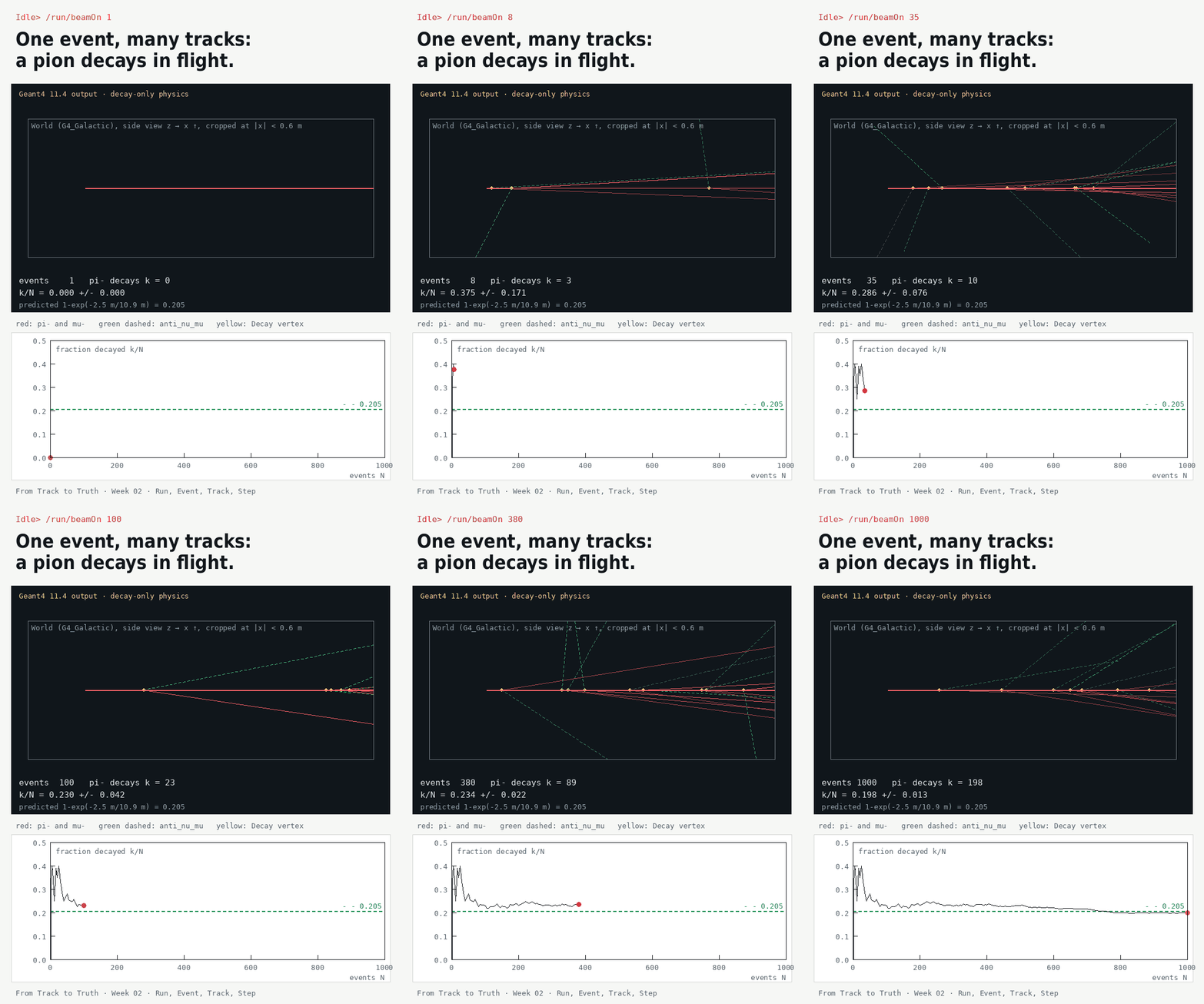
pion.mac (decay-only physics, vacuum). Long-press or right-click to save.来自 pion.mac 的真实 Geant4 11.4 径迹(仅衰变物理,真空)。长按或右键即可保存。One event can hold three tracks.一个事例里可以有三条径迹。
Post your μ⁻ count from step 7 with its σ and the GIF. In the course group, check that the class counts scatter around 205 with a spread of about 13.
把第 7 步的 μ⁻ 计数连同 σ 和这张 GIF 发出来。在课程群里看看全班的计数是否围绕 205 分布、离散约为 13。